Opsin raises $21M to secure the agentic enterprise.
Hear from our founders →


Opsin’s latest feature update, AIDR 2.0, extends AI agent detection and response to cover not just what was typed into an AI system, but whether the person, the agent, the data, and the action actually belong together.
An alert that says sensitive data showed up in an AI workflow tells a reviewer almost nothing on its own. The questions left unanswered:
Many AI-related incidents start from pieces that each look fine in isolation: a valid account, an approved AI tool, a file the user can technically reach, an agent shared a little more broadly than intended. The risk shows up when those pieces combine in a way that doesn't match how the business actually works. Reconstructing that chain by hand, actor to agent to data to action, is exactly the kind of work that turns AI alerts into a queue nobody trusts.
Traditional AI security tooling wasn't built to answer this. It can tell you a policy was matched or a keyword fired. It generally can't tell you whether an HR benefits agent pulling compensation data is normal for that agent, or whether a marketing coordinator using a legal contract assistant makes sense given their role. Posture tools show what could go wrong. Detection and response has to catch what happened, and explain why it matters.
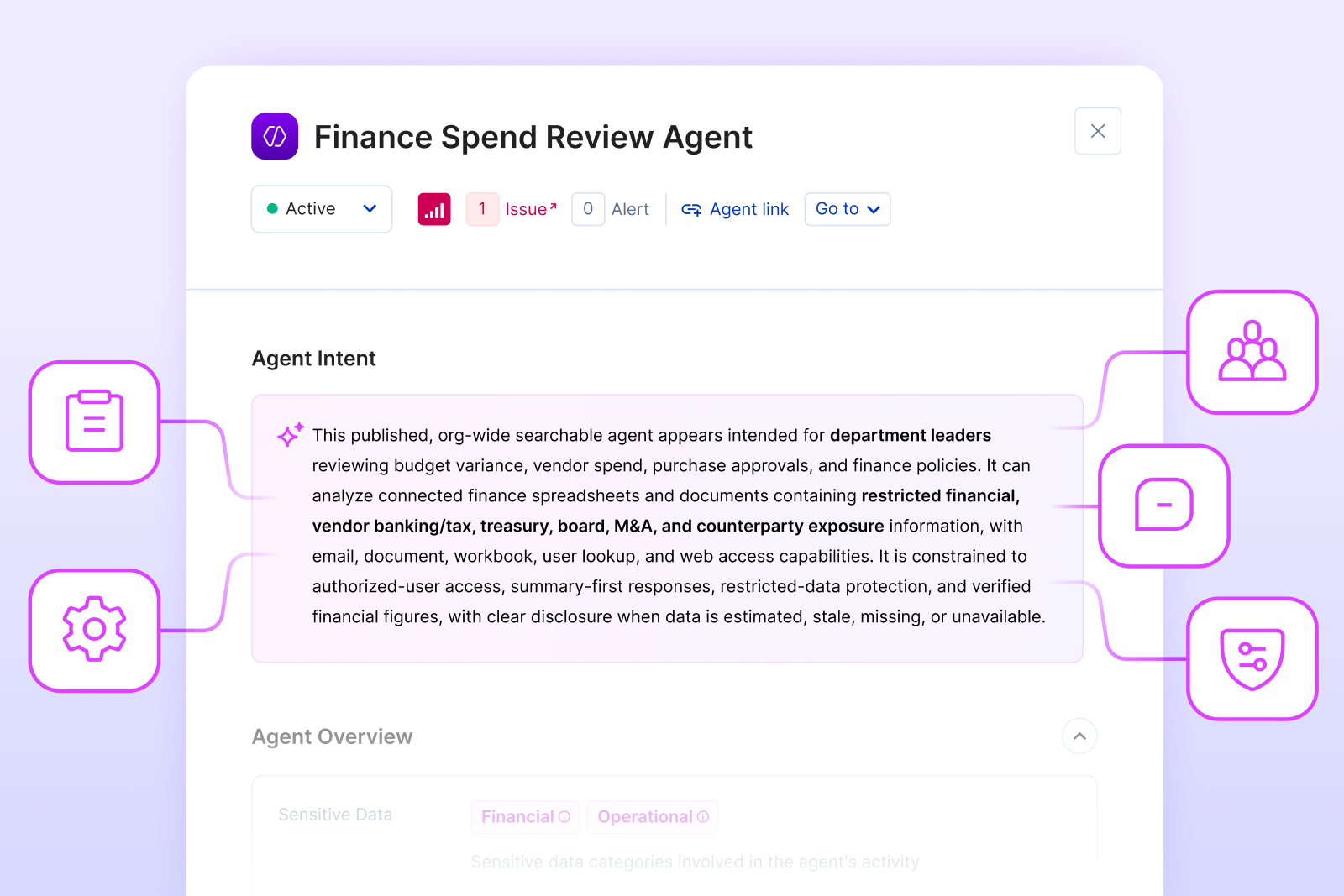
Opsin's approach starts from a different anchor point. **Agent Intent** captures what an agent was provisioned to do, its intended audience, business function, topic, actions, and declared constraints, based on evidence from setup rather than accumulated runtime behavior.
AIDR 2.0 is what happens when that intent context gets carried forward into the alert itself, so a reviewer isn't left reconstructing the story from raw logs.

AIDR 2.0 focuses on the relationships that make AI risk visible: what the agent was intended to do, who is using it, what data it can reach, and what action actually occurred.
Agent intent deviation detects when an AI agent's observed activity no longer matches what it was created to do. An agent may be approved, properly shared, and operating through sanctioned tools, but still create risk if its behavior drifts outside its intended purpose.
Opsin evaluates the agent's declared intent, intended audience, connected tools, data access, and observed activity together. The question is not only whether the agent was allowed to act, but whether the action still fits the agent's purpose, especially when new instructions come from untrusted external content or from an internal user pushing the agent beyond its intended workflow.
Unauthorized agent access asks whether a person has a plausible business reason to be using a given agent at all. Sharing settings alone doesn't answer this. A broadly shared agent might be misconfigured, and a narrowly shared one can still have the wrong audience using it. The signal Opsin compares the agent's declared purpose, tools, and data sources against the actor's business function.
AI-retrieved files role mismatch looks at a different exposure path: the agent retrieved a sensitive file that was broadly accessible, and the user never had to upload anything or bypass a control to get it. The agent simply found and returned material that was sitting somewhere in the environment.
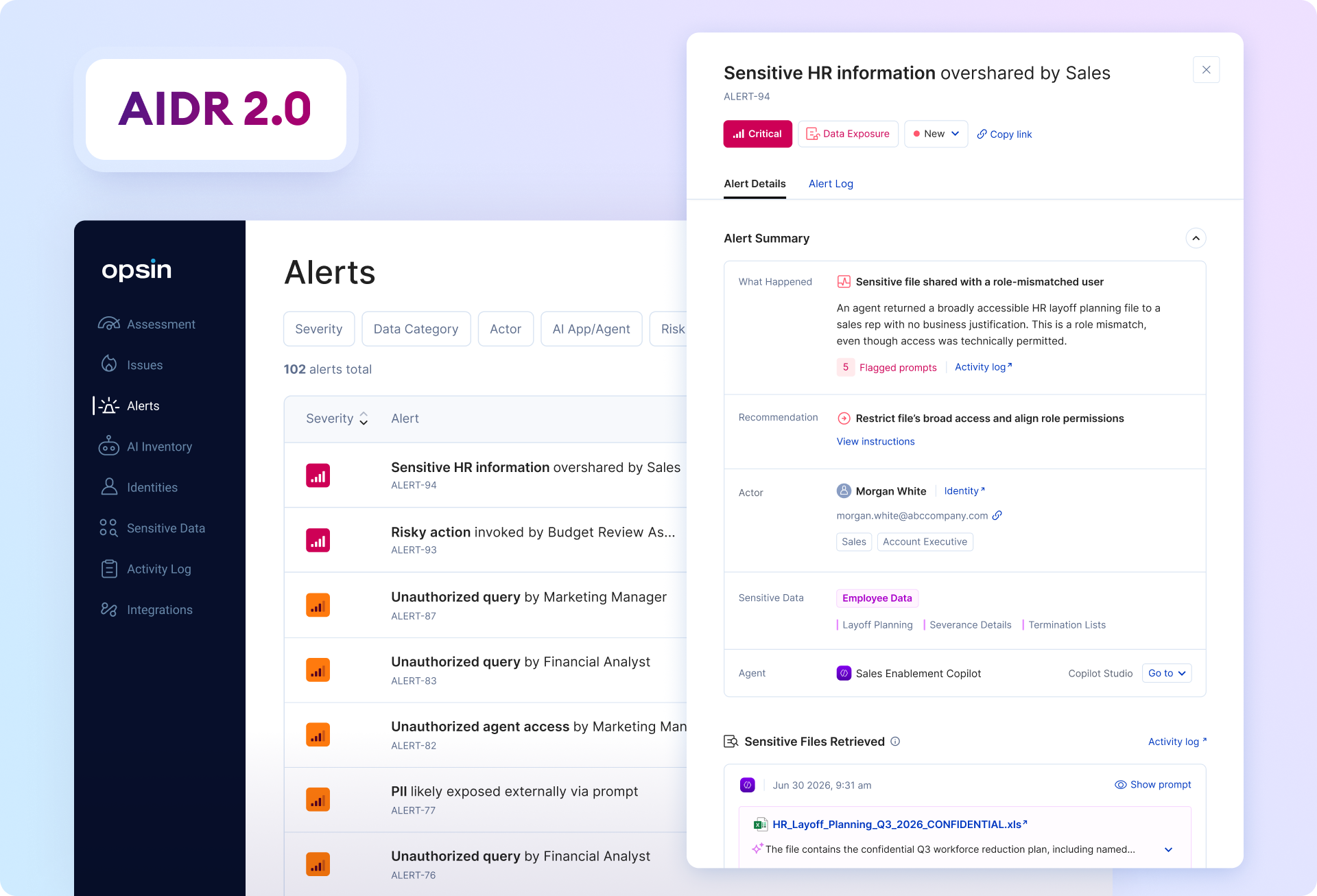
Opsin evaluates this against the user's business function and the sensitivity of what was returned. For example, a sales rep seeing an unredacted HR layoff planning file looks different from an HR analyst seeing that same file, even when both technically had permission.
Across these patterns, Opsin evaluates the same core relationship: who acted, what the agent was intended to do, what data was involved, and what the system actually retrieved, exposed, called, or acted on. When those elements do not line up, AIDR 2.0 surfaces the mismatch in plain language, along with the related agent or file and the activity that triggered the review.
That context is also what makes the finding actionable. An intent mismatch might mean restricting file sharing, adjusting group membership, quarantining an agent, narrowing the agent's tool access, or confirming a documented exception. Unauthorized agent access might mean narrowing the agent's intended audience, removing a data source, or resolving a related posture issue. In each case, the alert points somewhere specific instead of just adding to the pile.
Agent Intent defines what an agent is for. Agent Behavior Baselining tracks whether it's still behaving that way. AIDR 2.0 is where those two pieces turn into alerts a security team can actually act on. If you're evaluating how your AI detection stack handles agent-driven exposure, we're happy to walk through it.

AI posture management evaluates what could be risky in an AI environment. AIDR focuses on observed AI activity and the response path after a risky interaction is detected.
Agents can retrieve data, call tools, and act on behalf of people. AIDR has to evaluate whether the person, agent, data, and action fit the agent's intended use.
Security teams should review the activity, validate the intent mismatch, and remediate the underlying cause. That may mean restricting file access, adjusting group membership, narrowing agent sharing, removing data sources, resolving related issues, or educating the user.
Traditional AI security tools typically detect policy matches or keyword triggers, which tells a reviewer that something happened but not whether it was expected given the agent's purpose and the user's role.
AIDR 2.0 anchors detection to Agent Intent, meaning what an agent was provisioned to do, and Agent Behavior Baselining, meaning whether it's still operating within that scope.
This lets Opsin distinguish between activity that's technically permitted but contextually wrong, such as a marketing coordinator querying a legal contract assistant, and activity that's genuinely business as usual.
Each Opsin AIDR 2.0 alert identifies the actor, agent, data source, and action involved, along with why the combination is risky. From there, a reviewer can validate a documented exception, restrict file or data access, narrow an agent's intended audience or tool access, or quarantine the agent entirely. Because the alert already carries intent context, the next step is usually clear from the alert itself rather than requiring manual investigation across logs.
Opsin’s latest feature update, AIDR 2.0, extends AI agent detection and response to cover not just what was typed into an AI system, but whether the person, the agent, the data, and the action actually belong together.
An alert that says sensitive data showed up in an AI workflow tells a reviewer almost nothing on its own. The questions left unanswered:
Many AI-related incidents start from pieces that each look fine in isolation: a valid account, an approved AI tool, a file the user can technically reach, an agent shared a little more broadly than intended. The risk shows up when those pieces combine in a way that doesn't match how the business actually works. Reconstructing that chain by hand, actor to agent to data to action, is exactly the kind of work that turns AI alerts into a queue nobody trusts.
Traditional AI security tooling wasn't built to answer this. It can tell you a policy was matched or a keyword fired. It generally can't tell you whether an HR benefits agent pulling compensation data is normal for that agent, or whether a marketing coordinator using a legal contract assistant makes sense given their role. Posture tools show what could go wrong. Detection and response has to catch what happened, and explain why it matters.
Opsin's approach starts from a different anchor point. **Agent Intent** captures what an agent was provisioned to do, its intended audience, business function, topic, actions, and declared constraints, based on evidence from setup rather than accumulated runtime behavior.
AIDR 2.0 is what happens when that intent context gets carried forward into the alert itself, so a reviewer isn't left reconstructing the story from raw logs.
AIDR 2.0 focuses on the relationships that make AI risk visible: what the agent was intended to do, who is using it, what data it can reach, and what action actually occurred.
Agent intent deviation detects when an AI agent's observed activity no longer matches what it was created to do. An agent may be approved, properly shared, and operating through sanctioned tools, but still create risk if its behavior drifts outside its intended purpose.
Opsin evaluates the agent's declared intent, intended audience, connected tools, data access, and observed activity together. The question is not only whether the agent was allowed to act, but whether the action still fits the agent's purpose, especially when new instructions come from untrusted external content or from an internal user pushing the agent beyond its intended workflow.
Unauthorized agent access asks whether a person has a plausible business reason to be using a given agent at all. Sharing settings alone doesn't answer this. A broadly shared agent might be misconfigured, and a narrowly shared one can still have the wrong audience using it. The signal Opsin compares the agent's declared purpose, tools, and data sources against the actor's business function.
AI-retrieved files role mismatch looks at a different exposure path: the agent retrieved a sensitive file that was broadly accessible, and the user never had to upload anything or bypass a control to get it. The agent simply found and returned material that was sitting somewhere in the environment.
Opsin evaluates this against the user's business function and the sensitivity of what was returned. For example, a sales rep seeing an unredacted HR layoff planning file looks different from an HR analyst seeing that same file, even when both technically had permission.
Across these patterns, Opsin evaluates the same core relationship: who acted, what the agent was intended to do, what data was involved, and what the system actually retrieved, exposed, called, or acted on. When those elements do not line up, AIDR 2.0 surfaces the mismatch in plain language, along with the related agent or file and the activity that triggered the review.
That context is also what makes the finding actionable. An intent mismatch might mean restricting file sharing, adjusting group membership, quarantining an agent, narrowing the agent's tool access, or confirming a documented exception. Unauthorized agent access might mean narrowing the agent's intended audience, removing a data source, or resolving a related posture issue. In each case, the alert points somewhere specific instead of just adding to the pile.
Agent Intent defines what an agent is for. Agent Behavior Baselining tracks whether it's still behaving that way. AIDR 2.0 is where those two pieces turn into alerts a security team can actually act on. If you're evaluating how your AI detection stack handles agent-driven exposure, we're happy to walk through it.