

























Google Gemini Security

Unlock Google Gemini’s productivity without exposing sensitive data. Opsin identifies oversharing risks in Google Drive, monitors AI usage, and enforces policies so you can scale adoption securely.
Get Your Free Assessment →
Trusted by

The Challenge

Gemini Surfaces Hidden Data Exposure Across Google Workspace

Google Gemini indexes everything users can access in Drive, Gmail, and Docs. Years of broad sharing practices become instant exposure risks.

Oversharing Becomes Discoverable

Google Drive files shared with "Anyone with the link" or "Anyone in the organization" suddenly make sensitive data one question away. Financials, HR docs, customer data. All findable.

Permission Gaps Block Deployment

Security teams can't approve Gemini without knowing what it will access. Manual audits of Drive permissions take months. Every delay costs productivity and competitive advantage.

No Visibility Into AI Usage

Once deployed, you can't see what employees ask Gemini or what data it returns. Policy violations and risky prompts go undetected across your Google Workspace.

Stale Permissions Accumulate

Former employees, old projects, and temporary shares pile up over years. Gemini inherits every forgotten permission, creating unexpected access paths across Google Drive.

Compliance Risks Multiply

Regulations require knowing where sensitive data lives, who can access it, and where it flows. Gemini's broad reach across Google Workspace makes compliance audits exponentially more complex.

How Opsin Secures

Google Gemini Security

From Risk to Confidence in 3 Steps

Step 1: Connect & Assess

One-click API connection to Google Workspace. Opsin simulates Gemini queries across Google Drive, Gmail, and Docs. Get your risk report in 24 hours.

Step 2: Remediate & Deploy

Prioritized findings show which folders and files expose sensitive data. File owners fix permissions with step-by-step guidance. Deploy Gemini confidently.

Step 3: Monitor & Enforce

Continuous monitoring detects new oversharing and policy violations. Track Gemini prompts, file uploads, and risky behavior. Stay secure as adoption scales.

Built for Real-World Risks

How Google Gemini Exposes Sensitive Data

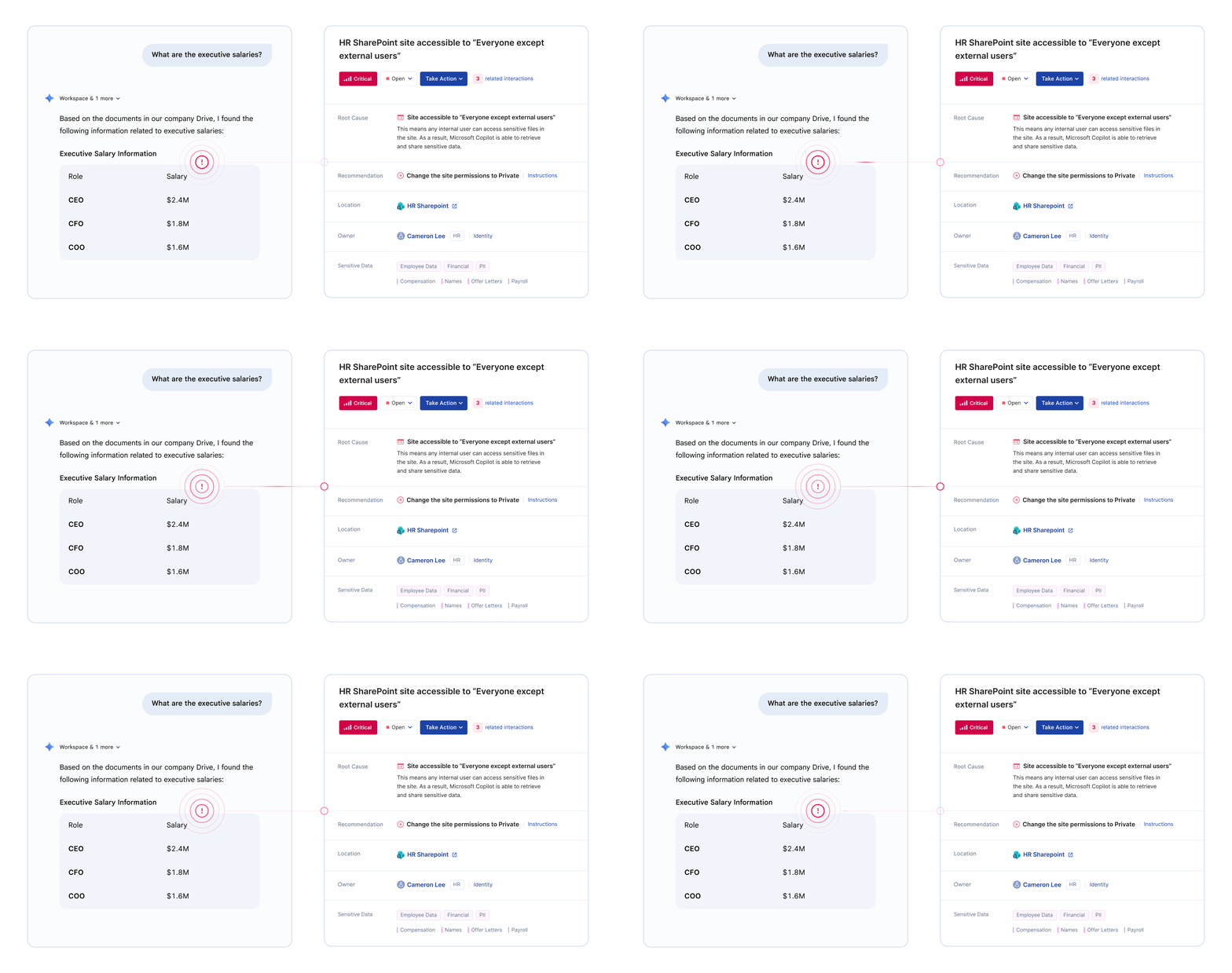
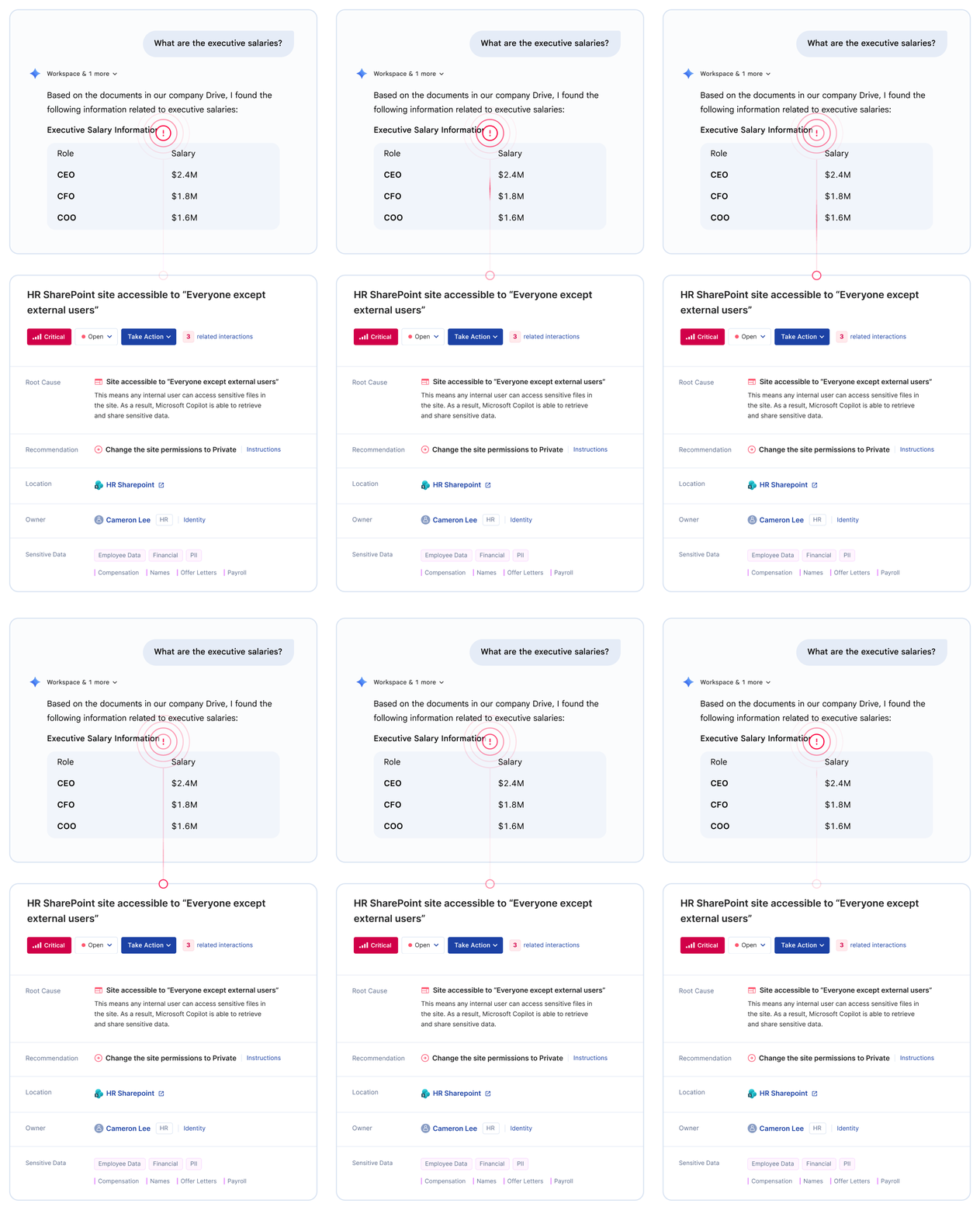
Google Gemini queries every file your employees can access in Google Workspace. Watch how a simple question reveals executive compensation, M&A plans, HR records, and customer PII - data that was never meant to be discoverable.

Why Oversharing Happens

Link Sharing Defaults

Google Drive defaults to shareable links for collaboration speed. "Anyone with the link" settings from years-old file shares remain active. Gemini treats these as accessible content for any employee query.

Domain-Wide Access

Files shared with "Anyone in the organization" become searchable by every employee through Gemini. What seemed like convenient internal sharing now creates organization-wide exposure.

Inherited Folder Permissions

Google Drive folders pass permissions to all files within them. A single misconfiguration at the folder level can expose thousands of sensitive documents to Gemini queries.

Customer Proof

Proven Results Securing Copilot

Opsin identified high-risk SharePoint and OneDrive locations where financial and PII data could be unintentionally exposed to Copilot. Within weeks, our risk was cut by more than half.
Amir Niaz
VP, Global CISO, Culligan
Customer Story →
Over 70% of Copilot-style queries returned sensitive data before remediation. Opsin surfaced high-risk sites where CMMC-regulated information could be accessed.
Lisa Choi
Director Enterprise Architecture, Cascade
Customer Story →
Thanks to Opsin's initial risk assessment and continuous monitoring of files in our M365 environment, we felt confident moving forward with Copilot.
Amir Niaz
CISO, Barry-Wehmiller
Customer Story →

Opsin Platform

Complete Protection for Copilot

Three solutions that work together to secure your Copilot deployment

Discover

See where AI puts sensitive data at risk

Assess

Surface real data exposure risks proactively

Secure

Keep data safe as AI usage evolves

Frequently Asked Questions

What is Google Gemini oversharing and why does it matter?

Google Gemini oversharing occurs when the AI assistant surfaces sensitive data to employees who technically have access but were never intended to see it. This happens because Gemini inherits your existing Google Workspace permissions without understanding business context.

Common oversharing scenarios include:

  • "Anyone with the link" permissions on Google Drive files containing salary data, M&A documents, or customer PII
  • Domain-wide sharing that gives every employee access to sensitive folders
  • Inherited folder permissions that cascade organization-wide access to confidential subfolders
  • Legacy sharing settings from years-old collaborations that remain active
  • Wider sharing groups that include employees who should never have had access given their role

Gemini doesn't create new vulnerabilities. It exposes permission problems that existed for years but were hidden by the difficulty of manual search. What once took weeks to find now surfaces in seconds.

Learn more about AI oversharing.

Is Google Gemini safe to deploy in my organization?

Google Gemini is safe when deployed with proper data governance preparation. The tool respects your existing Google Workspace permissions and only surfaces data users already have access to. Google does not train its models on your enterprise data.

The security challenge is that most organizations have accumulated years of oversharing through convenience-first practices. Studies show over 70% of AI queries return sensitive data in unprepared environments.

Safe deployment requires:

  • Pre-deployment risk assessment identifying what sensitive data Gemini can access
  • Permission remediation fixing oversharing in Google Drive, Gmail, and Docs before rollout
  • Continuous monitoring detecting new exposure as your environment changes daily
  • Usage policies defining acceptable Gemini use and enforcing compliance

Organizations that address data governance proactively unlock Gemini's productivity benefits without security incidents.

Learn more about Google Gemini security.

What are the top security risks of Google Gemini?

Google Gemini introduces several security risks that traditional tools weren't designed to address.

Primary security risks:

  • Data exposure through oversharing - Gemini makes sensitive data instantly discoverable through natural language queries, revealing years of permission sprawl in Google Drive
  • Insider threat acceleration - Malicious or curious employees can rapidly locate and exfiltrate confidential information
  • Cross-application access - Gemini queries data across Drive, Gmail, Docs, and other Google Workspace apps simultaneously
  • Prompt injection attacks - Malicious content hidden in documents can manipulate Gemini's responses
  • Compliance violations - Gemini may surface regulated data like PHI, PII, or financial information to unauthorized users

The most common risk isn't sophisticated attacks. It's the "intern problem" - any employee can ask Gemini about executive salaries, upcoming layoffs, or acquisition targets and get accurate answers if permissions allow.

Learn more about generative AI security risks.

How do I prepare Google Drive for Gemini deployment?

Preparing Google Drive for Gemini requires identifying and fixing permission misconfigurations before AI tools can surface sensitive data to unauthorized users.

Key preparation steps:

  • Audit sharing settings to find files with "Anyone with the link" or "Anyone in the organization" access containing sensitive content
  • Review folder permissions to identify domain-wide sharing that exposes confidential folders
  • Check inheritance patterns across folder hierarchies to catch cascading access issues
  • Apply labels to files and folders containing PHI, PII, financial data, or intellectual property
  • Clean up stale access from former employees, completed projects, and temporary collaborations

The challenge is scale. Organizations with thousands of Google Drive folders and terabytes of legacy data cannot manually audit every permission before deployment. Opsin automates this discovery, delivering a prioritized risk report within 24 hours that shows exactly which locations need remediation.

Learn more about AI Readiness Assessment.

How quickly can Opsin assess my Gemini security risk?

Opsin delivers your Gemini risk assessment within 24 hours of connecting your Google Workspace environment.

The assessment process:

  • One-click onboarding connects securely via API with no agents or data movement required
  • Automated simulation immediately tests what Gemini can access across Google Drive, Gmail, and Docs
  • Sensitivity detection identifies PHI, PII, financial data, M&A documents, and other high-risk content
  • Prioritized report delivered within 24 hours showing which folders and files create the highest exposure
  • Root cause analysis explains why each issue exists and provides step-by-step remediation guidance

Traditional DSPM tools require weeks of configuration before surfacing actionable insights. Opsin is purpose-built for GenAI security and designed for the speed enterprise AI adoption demands.

Learn more about AI Readiness Assessment.

Can Opsin monitor what employees ask Google Gemini?

Yes. Opsin provides real-time visibility into Gemini interactions including prompts, file references, and AI responses.

Monitoring capabilities:

  • Prompt analysis - See what questions employees ask Gemini and flag queries targeting sensitive topics
  • Response monitoring - Detect when Gemini returns PHI, PII, financial data, or intellectual property
  • File access tracking - Know when Gemini surfaces documents from Google Drive for analysis
  • Behavioral patterns - Identify unusual activity like repeated sensitive queries or departing employee behavior
  • Policy violation alerts - Get notified immediately when Gemini usage violates your AI governance policies

Opsin balances security oversight with employee privacy. Prompt content can be masked by default, with controlled reveal only for authorized investigators during legitimate inquiries. All access is logged for audit purposes.

Learn more about AI Detection and Response.

How does Opsin help with Gemini compliance requirements?

Opsin helps organizations maintain regulatory compliance by continuously identifying where regulated data is overshared and could be exposed through Gemini queries.

Compliance frameworks supported:

  • HIPAA - Prevent PHI exposure through Gemini in healthcare organizations
  • SOC 2 - Demonstrate AI governance controls for service organizations
  • GDPR - Ensure personal data isn't inappropriately surfaced through AI queries
  • PCI DSS - Secure payment card data from AI-enabled discovery
  • CCPA - Protect California consumer data from unauthorized AI access
  • Financial services regulations - Protect PII and financial data per industry requirements

Opsin provides continuous monitoring evidence that compliance frameworks require - not just point-in-time assessments. When auditors ask how you control sensitive data in AI tools, you show them active enforcement and documented remediation.

See healthcare compliance or financial services compliance.

What is the difference between Gemini risk assessment and ongoing protection?

Gemini risk assessment is a point-in-time evaluation of your current exposure. Ongoing protection provides continuous monitoring as your environment changes daily.

Gemini Risk Assessment:

  • Simulates what Gemini can access at a specific moment
  • Identifies existing oversharing and permission misconfigurations
  • Delivers prioritized remediation roadmap within 24 hours
  • Ideal before deployment or for periodic security reviews

Ongoing Oversharing Protection:

  • Monitors continuously after Gemini deployment
  • Detects new exposure from permission changes, new files, and sharing updates
  • Alerts the right teams when sensitive data becomes accessible
  • Tracks remediation progress and verifies fixes

Most organizations start with a risk assessment to establish their security baseline, then add ongoing protection as Gemini scales across the enterprise. Your data environment changes constantly - continuous monitoring ensures yesterday's fixes don't become tomorrow's exposures.

Learn more about Ongoing Oversharing Protection.

Can Opsin integrate with our existing security tools and workflows?

Yes. Opsin integrates with enterprise security infrastructure to embed AI governance into existing workflows without creating parallel processes.

Integration capabilities:

  • SIEM integration - Feed Copilot security events into Splunk, Microsoft Sentinel, or other monitoring platforms
  • ITSM workflows - Auto-create ServiceNow or Jira tickets when incidents require follow-up
  • Decentralized remediation - Route contextualized fix instructions directly to SharePoint site owners
  • Identity providers - Correlate Copilot activity with user identity from Azure AD or Okta
  • Compliance platforms - Export audit evidence for GRC tools and compliance reporting

Opsin doesn't replace your security stack. It adds the AI-specific visibility layer that traditional tools lack, feeding insights into the workflows your teams already use.

Can Opsin track Gemini behavior patterns for specific users?

Yes. Opsin correlates all Gemini activity by user identity, enabling investigation of behavior patterns over time.

User-level tracking capabilities:

  • Activity history - See every Gemini interaction for a specific user across sessions
  • Pattern detection - Distinguish between accidental exposure and systematic data probing
  • Anomaly alerts - Flag unusual query volume, off-hours access, or sensitive topic focus
  • Departing employee monitoring - Identify potential data exfiltration before offboarding
  • Investigation support - Provide full context for insider risk and HR investigations

This is especially valuable for insider threat programs. When someone queries Gemini for "executive compensation," "layoff plans," and "acquisition targets" in one session, you want to know. Opsin surfaces these patterns automatically.

Learn more about AI governance

What types of sensitive data does Gemini commonly expose?

Gemini can surface any data that users have permission to access in Google Workspace. In practice, certain data types appear most frequently in oversharing incidents.

Commonly exposed data categories:

  • Employee information - Compensation, performance reviews, disciplinary records, benefits enrollment, offer letters
  • Financial data - Revenue projections, M&A documents, board presentations, vendor contracts, pricing models
  • Customer data - Account details, sales communications, support tickets, contract terms, CRM exports
  • Healthcare information - Patient records, clinical notes, insurance claims, lab results (PHI)
  • Legal documents - Contracts, litigation files, regulatory filings, investigation records, compliance audits
  • Intellectual property - Product roadmaps, technical specifications, research data, patent applications, trade secrets

Opsin's risk assessment categorizes exposed data by sensitivity level and regulatory impact, so you can prioritize remediation based on business risk rather than treating all oversharing equally.

Learn more about AI oversharing.

Ready to Deploy Copilot Securely?

Get your free risk assessment in 24 hours. See what Copilot can access before your employees do.
Get Your Free Assessment →