Opsin raises $21M to secure the agentic enterprise.
Hear from our founders →

.webp)

Claude Cowork puts an autonomous agent in every employee's hands, not just developers. Anyone in the company can now connect Claude to Slack, Gmail, HubSpot, their file system, and dozens of other tools, then hand it a task and let it run. With Anthropic bringing Cowork to web and mobile, it's no longer confined to the desktop. Sessions now run in Anthropic's cloud, follow employees across devices, and keep working even when no device is online.
That employee in finance who just connected Cowork to the shared drive and their email? They didn't file a ticket or ask security. They just clicked “connect”.
Today we're announcing Opsin support for Claude Cowork, giving security and governance teams the visibility and guardrails they need to let their organization use Cowork safely.
Cowork is Anthropic's agent for non-developers. An employee describes what they want done, and Claude does the work: reading and writing files, searching email, updating CRM records, posting to Slack, pulling data from internal systems through connectors.
Where Claude Enterprise chat answers questions, Cowork takes actions. It reads real files, calls real APIs, and moves real data between real systems. And it does this on behalf of employees across every department, each running with their own permissions and their own set of connected tools.
Cowork started on the desktop. As of August 3, it also runs on web and mobile, with sessions hosted in Anthropic's cloud. An employee can kick off a task from their phone, pick it up on their laptop, and let scheduled tasks run in the background around the clock. Adoption just got easier, which means usage is about to grow, and so is the surface your team is responsible for governing.
Every Cowork session is a chain of tool calls the security team never sees. An agent might read a folder of contracts, summarize them, and send that summary through a connector to an external service. Each step looks reasonable on its own. Together, they can move sensitive data somewhere it was never supposed to go.
The risks compound in ways existing tools weren't built to catch:
DLP and CASB tools watch data moving through predictable channels. An agent chaining tool calls across email, files, and SaaS apps in a single session is not a predictable channel.
The answer isn't to block Cowork. Employees adopt these tools because they work. The answer is to see what's happening and govern it, so the organization gets the productivity without the exposure.
Opsin now covers Claude Cowork as part of our AI governance platform, alongside Claude Enterprise, Claude Managed Agents, Microsoft Copilot, ChatGPT Enterprise, and Google Gemini.
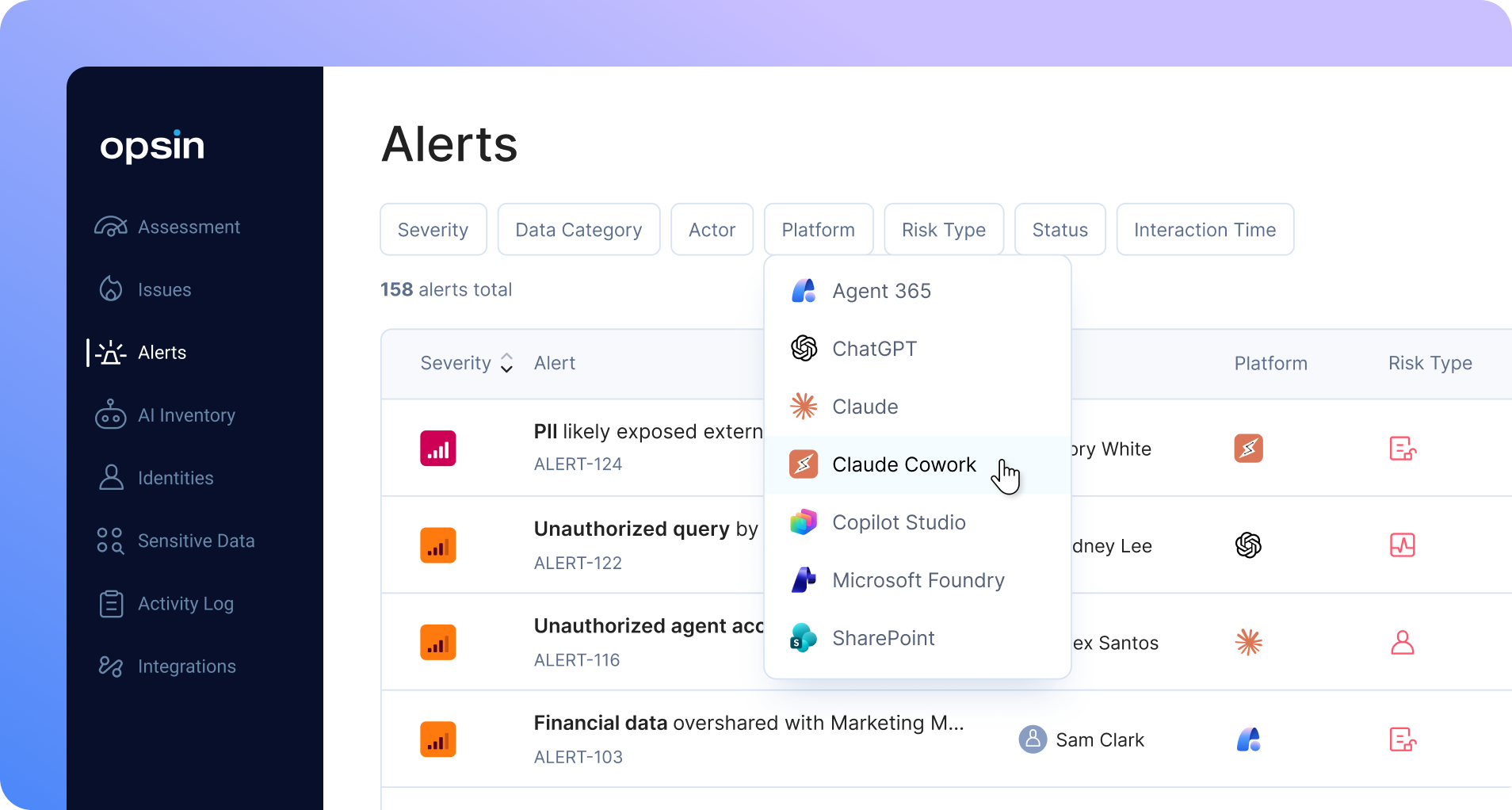
Opsin gives security teams a complete picture of Cowork usage across the organization: who is running sessions, what they're asking for, and every tool call the agent makes along the way. Coverage spans desktop, web, and mobile, so it doesn't matter where a session starts or which device picks it up. Chats and actions are captured with full context, so when a question comes up about what an agent did and why, the answer is a lookup, not an investigation.
Not every tool call is equal. An agent summarizing a public doc is routine. An agent reading a folder of employee compensation data and sending it through an external connector is not. Opsin analyzes tool calls in the context of the data they touch and alerts your team when an action puts enterprise sensitive data at risk, before a routine session becomes an incident you read about in a postmortem.
Connectors are where Cowork's power and its risk both live. Opsin inventories every connector in use across your Cowork deployment, shows which employees and sessions are using them, and checks that usage against your organization's governance policy. When a connector is used outside its approved purpose, or when someone connects a tool that was never approved at all, your team knows.
Security teams have been here before. A new tool spreads through the business faster than governance can keep up, and the choice looks like block it or accept the risk. Opsin gives you a third option: let employees use Cowork, with the visibility to know what's happening and the guardrails to keep sensitive data where it belongs.
That's what safe enablement looks like. Your organization gets the productivity. Your security team gets the control. Nobody has to choose.
Opsin's Claude coverage now spans Chat, Projects, Managed Agents, and Cowork: every way Claude operates in your enterprise, governed from one platform.

Claude Cowork is Anthropic's agentic tool for non-developers. Employees describe a task in plain language and Claude carries it out directly, reading and writing files, searching email, updating CRM records, and posting to Slack through connected tools.
Yes. Opsin provides visibility, risk alerts, and connector governance for Claude Cowork as part of its broader AI governance platform, which also covers Claude Enterprise, Claude Managed Agents, Microsoft Copilot, ChatGPT Enterprise, and Google Gemini.
Cowork lets employees connect Claude to data sources on their own, without a security review, and a single prompt can trigger dozens of tool calls across files, email, and business systems. With web and mobile access, sessions can also run in the cloud and continue unattended, so risky activity is no longer bounded by a managed laptop or a workday.
Opsin captures every Cowork session, prompt, and tool call across desktop, web, and mobile with full context, then analyzes each action against the sensitivity of the data it touches. When an action puts enterprise data at risk, Opsin alerts the security team before it becomes an incident.
Yes. Opsin inventories every connector in use across an organization's Cowork deployment, shows which employees and sessions are using each one, and checks that usage against the organization's governance policy.
Claude Cowork puts an autonomous agent in every employee's hands, not just developers. Anyone in the company can now connect Claude to Slack, Gmail, HubSpot, their file system, and dozens of other tools, then hand it a task and let it run. With Anthropic bringing Cowork to web and mobile, it's no longer confined to the desktop. Sessions now run in Anthropic's cloud, follow employees across devices, and keep working even when no device is online.
That employee in finance who just connected Cowork to the shared drive and their email? They didn't file a ticket or ask security. They just clicked “connect”.
Today we're announcing Opsin support for Claude Cowork, giving security and governance teams the visibility and guardrails they need to let their organization use Cowork safely.
Cowork is Anthropic's agent for non-developers. An employee describes what they want done, and Claude does the work: reading and writing files, searching email, updating CRM records, posting to Slack, pulling data from internal systems through connectors.
Where Claude Enterprise chat answers questions, Cowork takes actions. It reads real files, calls real APIs, and moves real data between real systems. And it does this on behalf of employees across every department, each running with their own permissions and their own set of connected tools.
Cowork started on the desktop. As of August 3, it also runs on web and mobile, with sessions hosted in Anthropic's cloud. An employee can kick off a task from their phone, pick it up on their laptop, and let scheduled tasks run in the background around the clock. Adoption just got easier, which means usage is about to grow, and so is the surface your team is responsible for governing.
Every Cowork session is a chain of tool calls the security team never sees. An agent might read a folder of contracts, summarize them, and send that summary through a connector to an external service. Each step looks reasonable on its own. Together, they can move sensitive data somewhere it was never supposed to go.
The risks compound in ways existing tools weren't built to catch:
DLP and CASB tools watch data moving through predictable channels. An agent chaining tool calls across email, files, and SaaS apps in a single session is not a predictable channel.
The answer isn't to block Cowork. Employees adopt these tools because they work. The answer is to see what's happening and govern it, so the organization gets the productivity without the exposure.
Opsin now covers Claude Cowork as part of our AI governance platform, alongside Claude Enterprise, Claude Managed Agents, Microsoft Copilot, ChatGPT Enterprise, and Google Gemini.
Opsin gives security teams a complete picture of Cowork usage across the organization: who is running sessions, what they're asking for, and every tool call the agent makes along the way. Coverage spans desktop, web, and mobile, so it doesn't matter where a session starts or which device picks it up. Chats and actions are captured with full context, so when a question comes up about what an agent did and why, the answer is a lookup, not an investigation.
Not every tool call is equal. An agent summarizing a public doc is routine. An agent reading a folder of employee compensation data and sending it through an external connector is not. Opsin analyzes tool calls in the context of the data they touch and alerts your team when an action puts enterprise sensitive data at risk, before a routine session becomes an incident you read about in a postmortem.
Connectors are where Cowork's power and its risk both live. Opsin inventories every connector in use across your Cowork deployment, shows which employees and sessions are using them, and checks that usage against your organization's governance policy. When a connector is used outside its approved purpose, or when someone connects a tool that was never approved at all, your team knows.
Security teams have been here before. A new tool spreads through the business faster than governance can keep up, and the choice looks like block it or accept the risk. Opsin gives you a third option: let employees use Cowork, with the visibility to know what's happening and the guardrails to keep sensitive data where it belongs.
That's what safe enablement looks like. Your organization gets the productivity. Your security team gets the control. Nobody has to choose.
Opsin's Claude coverage now spans Chat, Projects, Managed Agents, and Cowork: every way Claude operates in your enterprise, governed from one platform.