
Your security team knows AI is creating new risk. What they don't know is exactly how.
A SharePoint site is overshared. Microsoft Copilot has access to it. An employee asks a routine question. Confidential financial data ends up in a chat response. No malicious intent. No policy violation. Just the combination of AI reasoning, natural language, and a misconfigured permission, and suddenly sensitive data is in the wrong hands.
The problem isn't that something went wrong. The problem is that nobody could see it coming.
Today, we're introducing the Opsin AI Context Graph — the first visualization that maps the complete path from AI deployment to data exposure, so security teams don't just know that a risk exists. They know exactly how it happens.
Most AI security tools were built to do one thing: scan. They scan prompts for sensitive content. They scan API calls for anomalies. They flag misconfigurations in isolation. Legacy data security tools like DLP and CASB solutions, were designed for a world where data moved predictably across defined channels. AI doesn't move predictably. It reasons, infers, and surfaces data in ways those tools were never built to detect.
That's not enough anymore.
The questions that matter to security and IT teams aren't answered by pattern matching. They're answered by understanding relationships:
Traditional tools can tell you a SharePoint site is misconfigured. They cannot tell you which AI agents have access to it, what prompts surface that data, and what the response containing your Q4 revenue numbers actually looks like.
That’s the gap the Opsin AI Context Graph closes.
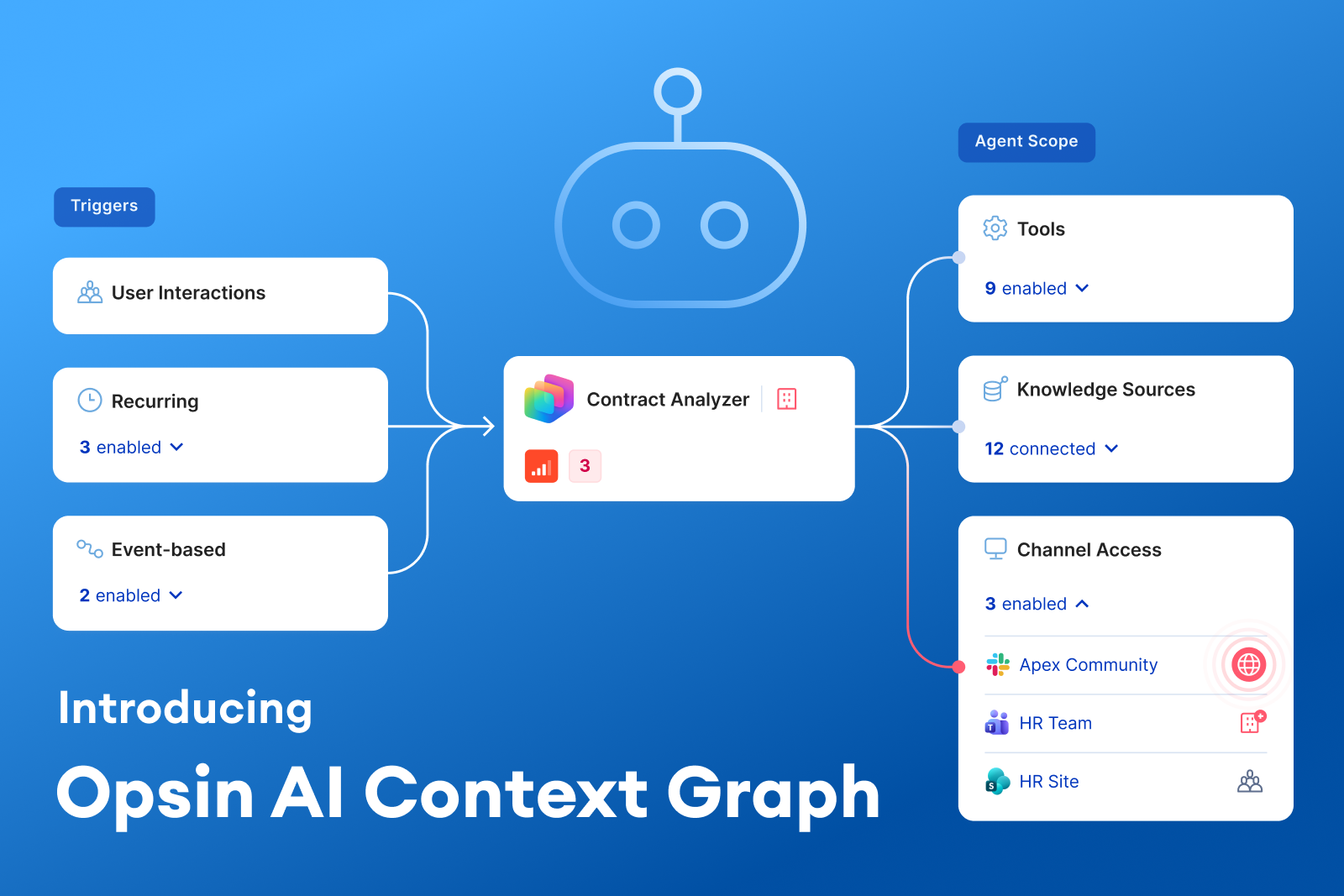
The Opsin AI Context Graph creates a connected, visual map of your entire AI risk surface, linking AI agents, users, data sources, permissions, and actual AI interactions into a single coherent picture.
It's built around a simple but powerful idea: AI risk isn't a single misconfiguration. It's a chain of relationships. You have to see the full chain to understand the risk and to fix it.
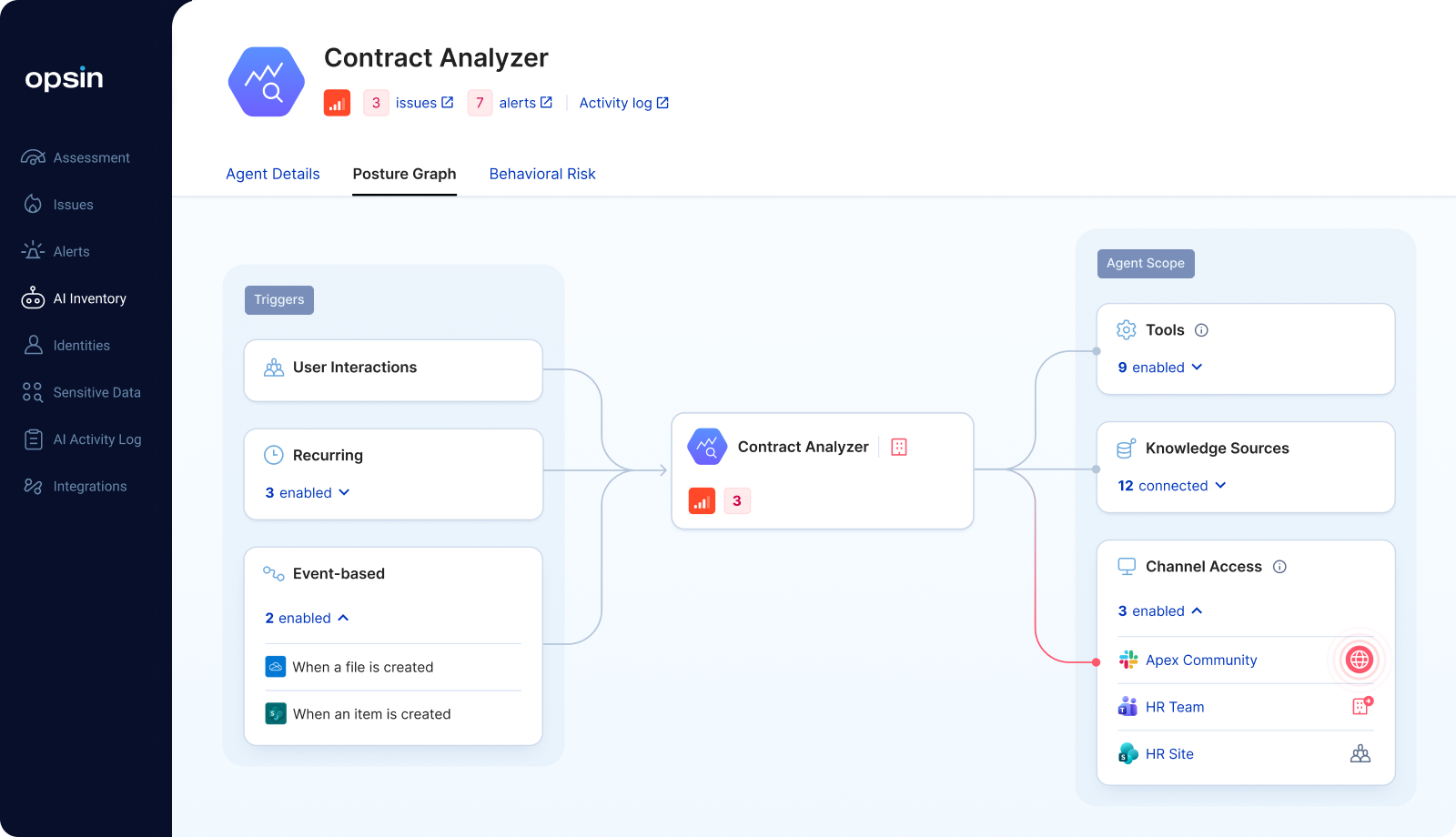
When Opsin identifies an oversharing issue, it doesn't just flag a misconfigured permission. It shows you the complete attack path, end to end:
Root Cause > Overshared Data > AI Interaction > Exposed Output
Here’s a concrete example. A SharePoint site is marked as accessible to everyone in the org. The Opsin AI Context Graph shows you exactly which documents sit within that site, the specific prompt used to surface that data, and the actual AI response containing the sensitive content. You see the misconfiguration, the mechanism, and the outcome, all connected.
This is what turns an abstract alert into an “aha moment.” Security teams don’t just know something is wrong. They understand it.
The Context Graph doesn't stop at individual incidents. It maps your entire AI landscape:
Security teams move from a fragmented view of individual agents and alerts to a unified picture of how everything connects.
When a DLP alert fires or an anomalous AI interaction is flagged, the Context Graph links that alert back to the complete story: the user prompt that triggered it, the AI response that contained the violation, the data sources accessed, and the permission misconfiguration that made it possible.
You're no longer investigating a symptom. You’re looking at the cause, the mechanism, and the full impact, all at once.
The security market has graph-based risk visualizations. Some vendors use them to show node relationships between users, environments, and data, and a few do it reasonably well within traditional CASB or data security posture management (DSPM) frameworks.
But none of them map what actually makes AI risk distinct: the behavioral layer. AI doesn't just access data. It reasons over it, combines it, and surfaces it in response to natural language. A misconfigured SharePoint permission is a latent risk. The moment a user asks Copilot “what were our revenue numbers last quarter?” that risk becomes an active exposure. This is the core challenge that neither legacy DLP, CASB, nor DSPM tools were designed to solve.
The Opsin AI Context Graph is the only visualization that connects the permission layer to the behavioral layer to the output layer, all in one place.
That's not an incremental improvement on what exists. It's a fundamentally different way to understand AI risk.
Here's what we hear from security teams consistently: they know they have AI risk. They have alerts. They have misconfiguration findings. What they don't have is clarity.
Which risks actually matter? How does a misconfiguration translate into real exposure? What would a real attack path through our AI environment actually look like?
The Opsin AI Context Graph answers all three. It turns abstract AI governance into concrete, visual, actionable security intelligence.
A finding like “SharePoint site overshared with all internal users” becomes: here are the five documents on that site. Here’s the Copilot prompt that surfaces Document 3. Here’s the response that returned the M&A term sheet. Here’s the permission you need to fix.
That's the clarity that drives remediation. That's the difference between a report that sits in a dashboard and one that gets acted on the same day.
Enterprises are accelerating AI adoption. Microsoft Copilot is rolling out across hundreds of thousands of seats. Employees are building agents in Copilot Studio and ChatGPT Enterprise without going through security review. Every new AI deployment expands the risk surface.
Continuous AI risk governance requires more than inventorying agents or scanning for keywords. It requires understanding the full context of how AI behaves in your environment, what it accesses, what it surfaces, and what path leads from deployment to exposure. Legacy approaches like DLP policies, CASB controls, and static permission audits catch fragments of this picture. They were never designed to connect them.
Opsin's approach, Discover, Secure, Protect, has always been grounded in that contextual understanding. The AI Context Graph is how that context becomes visible.
You can't govern what you can't see. Now you can see it all.
The Opsin AI Context Graph is available now as part of the Opsin platform.
Your security team knows AI is creating new risk. What they don't know is exactly how.
A SharePoint site is overshared. Microsoft Copilot has access to it. An employee asks a routine question. Confidential financial data ends up in a chat response. No malicious intent. No policy violation. Just the combination of AI reasoning, natural language, and a misconfigured permission, and suddenly sensitive data is in the wrong hands.
The problem isn't that something went wrong. The problem is that nobody could see it coming.
Today, we're introducing the Opsin AI Context Graph — the first visualization that maps the complete path from AI deployment to data exposure, so security teams don't just know that a risk exists. They know exactly how it happens.
Most AI security tools were built to do one thing: scan. They scan prompts for sensitive content. They scan API calls for anomalies. They flag misconfigurations in isolation. Legacy data security tools like DLP and CASB solutions, were designed for a world where data moved predictably across defined channels. AI doesn't move predictably. It reasons, infers, and surfaces data in ways those tools were never built to detect.
That's not enough anymore.
The questions that matter to security and IT teams aren't answered by pattern matching. They're answered by understanding relationships:
Traditional tools can tell you a SharePoint site is misconfigured. They cannot tell you which AI agents have access to it, what prompts surface that data, and what the response containing your Q4 revenue numbers actually looks like.
That’s the gap the Opsin AI Context Graph closes.
The Opsin AI Context Graph creates a connected, visual map of your entire AI risk surface, linking AI agents, users, data sources, permissions, and actual AI interactions into a single coherent picture.
It's built around a simple but powerful idea: AI risk isn't a single misconfiguration. It's a chain of relationships. You have to see the full chain to understand the risk and to fix it.
When Opsin identifies an oversharing issue, it doesn't just flag a misconfigured permission. It shows you the complete attack path, end to end:
Root Cause > Overshared Data > AI Interaction > Exposed Output
Here’s a concrete example. A SharePoint site is marked as accessible to everyone in the org. The Opsin AI Context Graph shows you exactly which documents sit within that site, the specific prompt used to surface that data, and the actual AI response containing the sensitive content. You see the misconfiguration, the mechanism, and the outcome, all connected.
This is what turns an abstract alert into an “aha moment.” Security teams don’t just know something is wrong. They understand it.
The Context Graph doesn't stop at individual incidents. It maps your entire AI landscape:
Security teams move from a fragmented view of individual agents and alerts to a unified picture of how everything connects.
When a DLP alert fires or an anomalous AI interaction is flagged, the Context Graph links that alert back to the complete story: the user prompt that triggered it, the AI response that contained the violation, the data sources accessed, and the permission misconfiguration that made it possible.
You're no longer investigating a symptom. You’re looking at the cause, the mechanism, and the full impact, all at once.
The security market has graph-based risk visualizations. Some vendors use them to show node relationships between users, environments, and data, and a few do it reasonably well within traditional CASB or data security posture management (DSPM) frameworks.
But none of them map what actually makes AI risk distinct: the behavioral layer. AI doesn't just access data. It reasons over it, combines it, and surfaces it in response to natural language. A misconfigured SharePoint permission is a latent risk. The moment a user asks Copilot “what were our revenue numbers last quarter?” that risk becomes an active exposure. This is the core challenge that neither legacy DLP, CASB, nor DSPM tools were designed to solve.
The Opsin AI Context Graph is the only visualization that connects the permission layer to the behavioral layer to the output layer, all in one place.
That's not an incremental improvement on what exists. It's a fundamentally different way to understand AI risk.
Here's what we hear from security teams consistently: they know they have AI risk. They have alerts. They have misconfiguration findings. What they don't have is clarity.
Which risks actually matter? How does a misconfiguration translate into real exposure? What would a real attack path through our AI environment actually look like?
The Opsin AI Context Graph answers all three. It turns abstract AI governance into concrete, visual, actionable security intelligence.
A finding like “SharePoint site overshared with all internal users” becomes: here are the five documents on that site. Here’s the Copilot prompt that surfaces Document 3. Here’s the response that returned the M&A term sheet. Here’s the permission you need to fix.
That's the clarity that drives remediation. That's the difference between a report that sits in a dashboard and one that gets acted on the same day.
Enterprises are accelerating AI adoption. Microsoft Copilot is rolling out across hundreds of thousands of seats. Employees are building agents in Copilot Studio and ChatGPT Enterprise without going through security review. Every new AI deployment expands the risk surface.
Continuous AI risk governance requires more than inventorying agents or scanning for keywords. It requires understanding the full context of how AI behaves in your environment, what it accesses, what it surfaces, and what path leads from deployment to exposure. Legacy approaches like DLP policies, CASB controls, and static permission audits catch fragments of this picture. They were never designed to connect them.
Opsin's approach, Discover, Secure, Protect, has always been grounded in that contextual understanding. The AI Context Graph is how that context becomes visible.
You can't govern what you can't see. Now you can see it all.
The Opsin AI Context Graph is available now as part of the Opsin platform.